Skip to content

Coming soonFor home services, salons and anyone who books appointments

Never lose a job because you were on a ladder.

FrontLark runs your front office: phone, website, forms and payments, with a sharp assistant built in. It answers, books and gets you paid while you’re on the job.

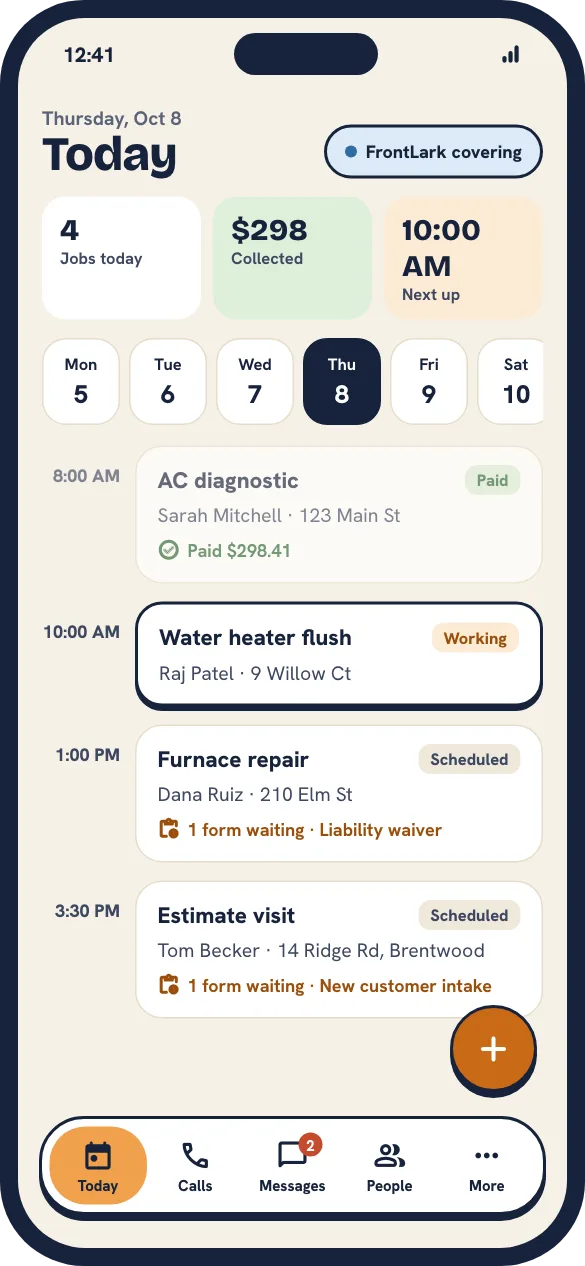
FrontLark phone app, Today: four jobs, $298 collected, and the day’s schedule from a paid AC diagnostic to an estimate visit with a form waiting.
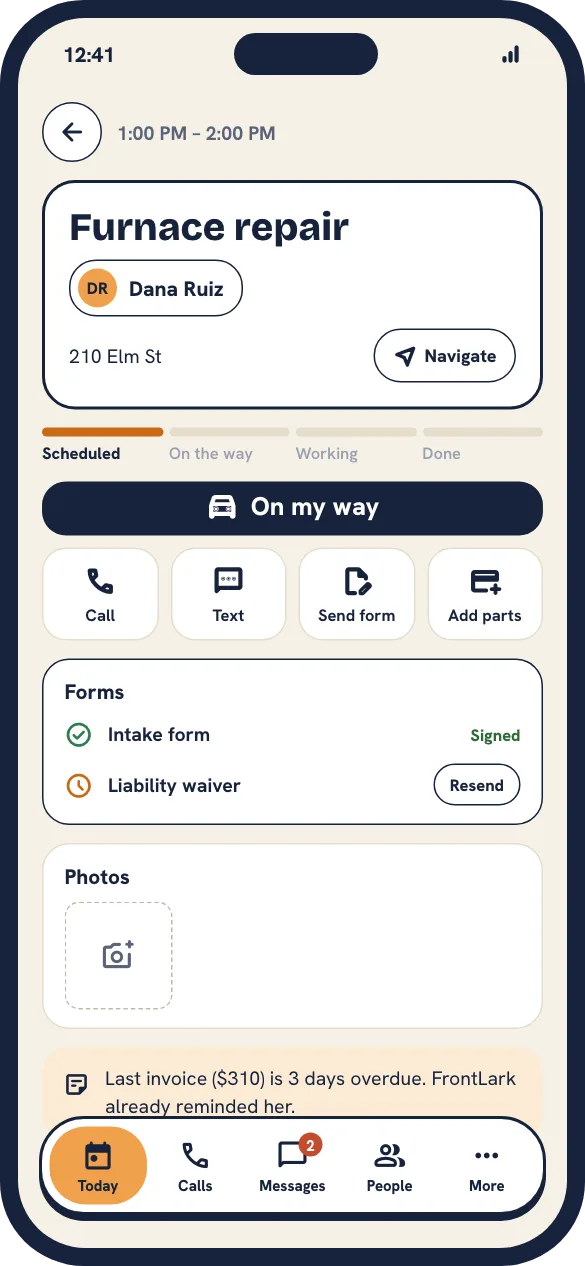
FrontLark phone app, a job: furnace repair for Dana Ruiz with On my way, Call, Text, Send form and Add parts, the signed intake form and a note that her last invoice is overdue.

One front office, four ways in

Every way a customer reaches you, handled.

Scroll to follow one day at Summit Heating & Air, from the first call to the last payment. Or jump to a product.

  1. PhoneIt starts with a call.

    Step 1, 2:41 PM

    The phone rings.

    Your crew gets first dibs. Mike, Dana and the office all ring at once for twelve seconds.

  2. Step 2, 0:12

    Nobody can grab it. FrontLark does.

    Everyone’s on a job. It answers in your company’s name with one goal: book the work.

  3. Step 3, 0:40

    It knows who’s calling.

    Returning customer, AC not cooling, wants tomorrow. Her address and last service are up before she finishes the sentence.

  4. Step 4, 1:52

    It knows when to get you.

    Sarah asks about pricing. It’s not allowed to quote, so it keeps her on the line and pings you.

  5. Step 5, 2:05

    You jump in with one tap.

    No hold music. No “can you repeat that.” It introduces you and you pick up mid-conversation.

  6. Step 6, 2:40

    Hand it back. Get back to work.

    Answer the question, tap Hand Off, hang up. FrontLark finishes the booking.

  7. Step 7, 4:12

    Booked. Confirmed. On the calendar.

    Sarah gets a confirmation text. You get a summary on your phone.

  1. WebsiteNext, the customers who never call.

    Step 1, Same day

    Brief it once.

    Services, service area, hours. The same answers you already gave the phone, so your site is ready too.

  2. Step 2, Five minutes later

    Your site builds itself.

    A fast, clean site with your services, your area and your real reviews. Change any word you like.

  3. Step 3, Tuesday, 3:12 PM

    Customers book themselves.

    Book online shows the open slots on your real calendar. No back-and-forth.

  4. Step 4, Tuesday, 11:04 PM

    Questions get answered at 11 PM.

    The assistant that answers your phone also answers website chat, with the same rules.

  5. Step 5, Wednesday, 7:00 AM

    Every lead lands in one place.

    Web bookings and chats show up next to your calls, on each customer’s record.

  1. FormsThen the paperwork.

    Step 1, Next morning, 6:48 AM

    A request comes in through your site.

    Service requests, intake questionnaires, liability waivers, photos. On your FrontLark site, and soon embedded in the one you have.

  2. Step 2, 6:48 AM

    FrontLark reads it.

    It pulls out the problem, how urgent it is and what the job might be worth.

  3. Step 3, 6:50 AM

    It asks what the form missed.

    A quick text fills in the gaps, so nobody plays phone tag at lunch.

  4. Step 4, 6:53 AM

    Urgent jobs go straight to you.

    Leaks, no heat, no cooling. It follows your escalation rules, same as on the phone.

  5. Step 5, 7:05 AM

    Paperwork signed before you arrive.

    FrontLark texts the intake form and liability waiver. John signs on his phone, so Mike isn’t chasing signatures in the garage.

  6. Step 6, 7:06 AM

    Saved to the customer.

    Request, photos, texts, signed waiver and the job live on one record. Nobody retypes anything.

  1. PaymentsAnd finally, getting paid.

    Step 1, Next day, 10:41 AM

    Sarah’s invoice is already written.

    Remember her call? FrontLark starts the invoice from that booking and the call notes. Add the part, done.

  2. Step 2, 10:42 AM

    Tap to pay, right on your phone.

    Cards and phone wallets, taken in the driveway. No extra hardware on the truck.

  3. Step 3, 10:42 AM

    Paid before you pack up.

    The receipt goes out by text and the job is marked paid.

  4. Step 4, 10:43 AM

    It asks for the review.

    A thank-you text with your review link, and an offer to book the next tune-up.

  5. Step 5, 6:00 PM

    Your day, added up.

    Collected, outstanding and who still owes you, without opening a spreadsheet.

Transcript of Sarah’s call

  1. FrontLark: Thanks for calling Summit Heating. How can I help?
  2. Sarah: My AC stopped cooling this afternoon.
  3. FrontLark: Sorry about that. Is this for 123 Main Street?
  4. Sarah: Yes. Could someone come tomorrow morning?
  5. FrontLark: We have tomorrow at 9:30 AM open.
  6. Sarah: Does the diagnostic fee count toward the repair?
  7. FrontLark: Let me grab the owner for that. One moment.
  8. FrontLark: Sarah, Micah is joining. He has everything you told me.
  9. Micah (owner): Hi Sarah. Yes, the $89 comes off any repair we do.
  10. Micah (owner): I’ll let FrontLark get you booked.
  11. FrontLark: You’re set for tomorrow at 9:30. Confirmation’s on its way.

Outcome: job booked for tomorrow at 9:30 AM, AC diagnostic, confirmation texted.

The office behind all four

Run the whole day from one place.

Every call, booking, form and payment lands on the same schedule and customer record, and the follow-ups send themselves.

A schedule that knows how you work

Drive time, buffers, vans and chairs, processing gaps. FrontLark only offers times that actually fit.

Thu, Oct 8

One record per customer

Calls, texts, forms, photos and payments in one place.

Follow-ups on autopilot

Reminders, no-shows, reviews and win-backs. Start from a recipe.

See what it earned you

Revenue, bookings, no-shows and how full everyone’s day is.

One customer. One record.

Every product shares the same customers, calendar and rules. Here’s Sarah’s year with Summit.

  1. Finds you on a hot day

    Sarah searches for AC repair, lands on your site and books a diagnostic for Tuesday.

  2. Calls with a question

    FrontLark answers, sees her booking and moves it up a day.

  3. Pays in the driveway

    Tap to pay on your phone. Receipt and review request go out by text.

  4. Comes back in the fall

    Her tune-up intake form arrives already filled in with her address and unit. She signs the waiver in a tap.

The phone app

Your day, in your pocket.

Every tech and stylist gets the app. See today’s jobs, text customers from the business number, get signatures and take payment on the spot.

  • “On my way” texts the arrival time
  • Forms and photos saved to the job
  • Tap to pay, no card reader
  • FrontLark taps you when it needs you
  • App Store
  • Google Play

Coming soon

Measured in jobs booked and paid.

Example: Summit Heating & Air, one month

Calls answered
163
Booked from your website
58
Form requests turned into jobs
31
Collected on site
$38.2k

Live in ten minutes.

Calls and bookings work the same day. Carriers take 1–3 weeks to approve texting, and Stripe may ask for ID before your first payout. FrontLark handles both in the background.

  1. Pick your business type

    Home services, beauty or something else. Your pipeline, forms and reminders are set up to match.

  2. Add services and your team

    Lengths, prices and who does what. We start the list from your website.

  3. Get a number and a website

    A local number and a live site today. Keep your own number or domain if you have one.

  4. Verify once

    One set of business details registers you for texting and payments.

Join the waitlist